Organize a Company Team-Building Day Attendance Using a Sign Up Sheet
Planning a company team-building day can involve many moving parts—transport, catering, and activities—all of which depend on knowing exactly who will attend. With Xoyondo’s Sign Up sheets, you can collect attendance confirmations and additional participant details in a structured, easy-to-manage way.
In this example, we’ll walk you through how HR can organize a Single Date RSVP Sign Up sheet for an outdoor team-building event, while also gathering transport requirements and dietary restrictions.
Step 1: Create the Sign Up Sheet
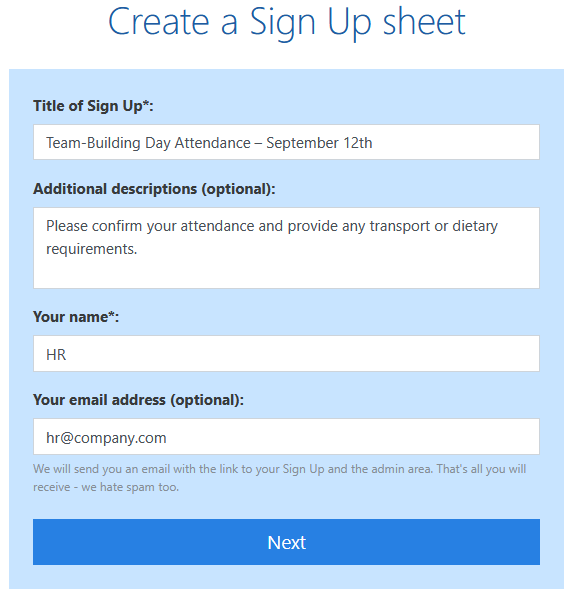
Start by clicking “Create” in the top right corner on any Xoyondo page and selecting “Create a Sign Up sheet”. Give your sheet a clear, descriptive name such as: “Team-Building Day Attendance – September 12th”
You can also add an optional description for participants, e.g., “Please confirm your attendance and provide any transport or dietary requirements.”
Step 2: Choose the Single Date RSVP Format
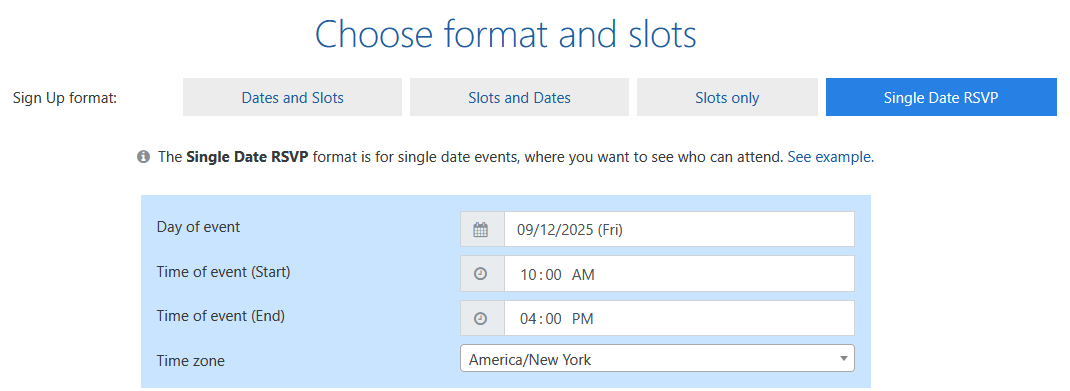
Since the event date is fixed (September 12th), select the “Single Date RSVP” format. This allows participants to indicate whether they will attend the event or not. Next, choose the day, the time and the time zone of the event.
Step 3: Add Additional Questions and set advanced options
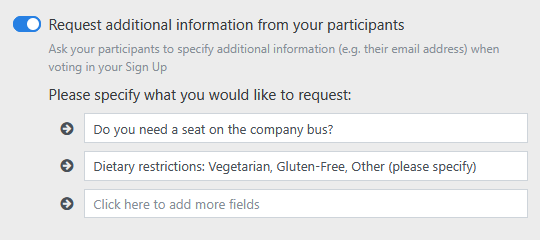
Xoyondo allows you to request extra information when participants sign up (note that this is a Premium feature). For this event, we are going to add fields for:
- Transport requirements: e.g., “Do you need a seat on the company bus?”
- Dietary restrictions: e.g., “Vegetarian, Gluten-Free, Other (please specify)”
Depending on your needs, you can also configure:
- Limit the maximal number of people who can attend your event: If transport or activities have limited capacity, restrict the number of sign-ups for the company day.
- Confidential Sign Up: Only HR can view the full list of responses.
Step 4: Share the Sign Up Sheet
Once the sheet is ready, Xoyondo generates two links:
- Participant link: Share this with your employees via email or chat. Participants can sign up and fill in the additional details.
- Administrator link: Keep this for yourself to manage and edit the Sign Up sheet.
Distribute the link and track responses in real time. You’ll quickly see how many employees will attend, who needs transport, and any dietary restrictions.
This is what the participants will see when going to the participant link:
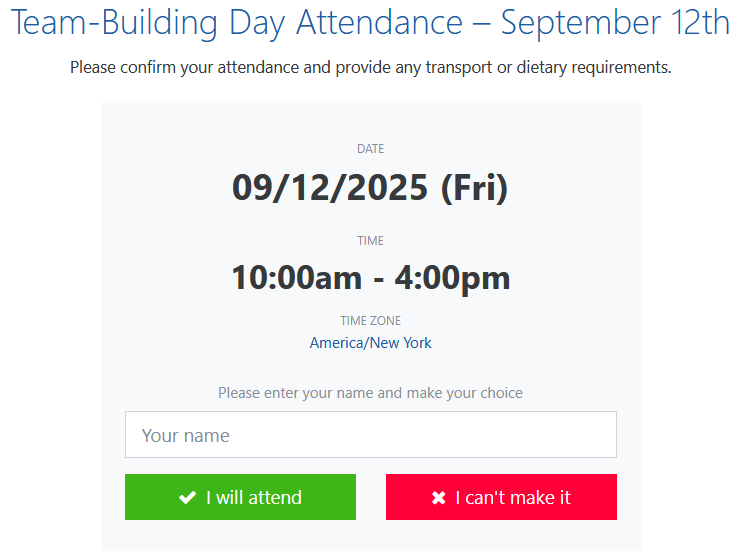
All they have to do is fill in their name and click on one of the buttons. In the next step they will be asked to answer the additional questions that we specified during the setup process. Once they have done so, their vote will be saved and is available to the HR team via the admin area of the Sign Up sheet.
Step 5: Monitor and Use Responses
With all the responses in one place, HR can:
- Arrange transport only for participants who requested it
- Prepare catering according to dietary restrictions
- Assign participants to teams or activities efficiently
- Export the results (including transport and dietary info) to Excel for simpler sharing and planning within the HR team
Using a Sign Up sheet simplifies coordination, avoids overbooking, and ensures a smooth and enjoyable team-building day.
Organize a Company Team-Building Day Attendance Using a Sign Up Sheet
Learn how to efficiently track attendance for your company team-building day using a Xoyondo Sign Up Sheet. Collect participant responses, transport needs, and dietary restrictions in one place.
Read time: 5 minutes