Group Polls vs. Sign Up Sheets: When to Use What
Xoyondo offers two versatile tools for organizing participation: Group Polls and Sign Up sheets. Both help streamline planning and keep everyone on the same page—but they shine in different scenarios.
Choosing the right tool depends on the type of event, the number of participants, and how you want to collect responses. Here’s a practical guide to help you decide.
When to Use a Group Poll
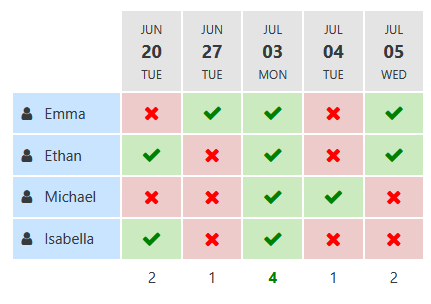
A Group Poll is perfect when your goal is to find a mutually convenient time for a meeting or event. Participants indicate their availability for each proposed date or option, and you can quickly see which option works best for the majority.
Use a Group Poll when:
- You need to schedule a single meeting or event date/time
- You want a quick overview of participant availability
- The number of options are few and there many participants who potentially vote "Yes" for each option
- You prefer a flexible, democratic approach to scheduling
Pro tip #1: While Xoyondo allows free text options in Group Polls, using them like a Sign Up sheet is only efficient when there is a small number of options (columns in the resulting poll table). For larger events (many options to choose from) with many participants and limited slots per option, Sign Up sheets are more practical and easier to manage.
Pro tip #2: Many organizers set up group polls with a single date to find out who is attending a planned event and who won't be attending. While this works just fine, it is more convenient to a Sign Up sheet for that, specifically the "Single Date RSVP" format. It was designed exactly for that use case!
When to Use a Sign Up Sheet
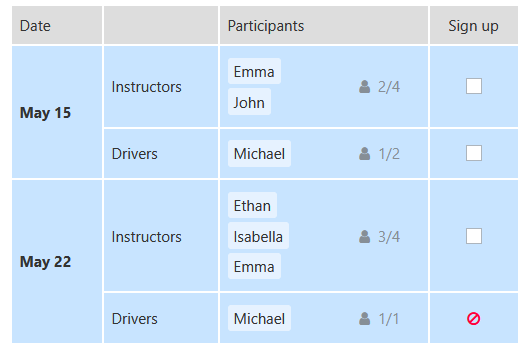
A Sign Up sheet is designed to manage enrollment for pre-scheduled sessions, shifts, or activities. Each participant can select from predefined slots, ensuring you never overbook an option.
Sign Up sheets are ideal when:
- You have fixed dates, times, or slots for multiple sessions or activities
- You need to assign participants to specific tasks or roles
- You want to limit how many participants can sign up for each option (note that this is also possible in group polls)
- You want a clear overview of who has signed up for what
Using a Sign Up sheet helps reduce confusion, save time, and ensure your event runs smoothly, even with a large number of participants or complex scheduling needs.
Quick Comparison
| Feature | Group Poll | Sign Up Sheet |
|---|---|---|
| Purpose | Find a mutually convenient time or option | Collect enrollment for pre-scheduled slots |
| Best for | Single meetings/events with flexible scheduling | Multiple sessions, shifts, or tasks with limited capacity |
| Participant input | Availability or preference | Slot selection for fixed options |
| Efficiency | Most efficient when the number of options to choose from is small. It works well in that case even for many participants who may vote "Yes" for multiple options | Most efficient when there are a lot of options to choose from and each participant only signs up for a small number of options |
Use Cases
Examples where a Group Poll is ideal:
- Team meetings or project discussions
- Small company events or social gatherings
- Board or committee scheduling
Examples where a Sign Up sheet excels:
- Workshops, training sessions, or coaching events
- Volunteer or staff shifts
- School events, company retreats, or breakout groups

7 Useful Tips for Effective Group and Meeting Polls
7 Useful Tips for Effective Group and Meeting Polls
Read time: 4 minutes

Group Polls vs. Sign Up Sheets: When to Use What
Discover the key differences between Group Polls and Sign Up sheets on Xoyondo. Learn when to use each tool to schedule meetings, manage events, and organize participants efficiently.
Read time: 5 minutes